

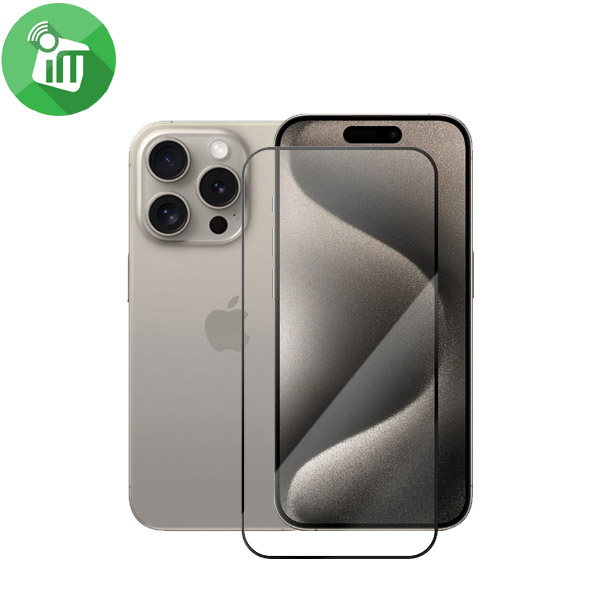
Zagg Glass Elite Edge VisionGuard Screen Protector iPhone 15 Pro Max

- Introducing Glass Elite Edge VisionGuard your Screen’s guardian angel.
- With 5X shatter protection and Eyesafe technology Fltering toxic blue light
- it’s a fortress for both safety and Comfort.
- Experience full-screen coverage, smudge-Free clarity, and Anti-Microbial peace of mind.
- Applying it is a breeze with EZ Apply tabs and Anti-static wizardry.
- Elevate your screen’s protection and keep your eyes in the safe zone.
899 EGP 1,170 EGP
Zagg Glass Elite Edge VisionGuard Screen Protector iPhone 15 Pro Max
Overview
5X Shatter Protection
Glass Elite Edge VisionGuard is 5X more protective than an unprotected screen.

Protective Eyesafe Layer
Eyesafe technology filters 60% of peak toxic blue light at 435-440mm, protecting from the effects of over exposure to high-energy blue light.
Full screen Coverage
Maximized case friendly coverage for full screen protection.

Smudge-free
A smudge-free coating protects from fingerprints and makes wiping dirt away simple.

Anti-Microbial Technology
Glass Elite Edge VisionGuard contains anti-microbial properties that protect the screen protector by protecting against degradation from microorganisms.
EZ Apply Installation
EZ Apply tabs and a drop-in installation tray make applying your Glass Elite Edge VisionGuard easily and accurately.

Anti-Static
The anti-static solution prevents dust from the air from being absorbed onto the adhesive side of the glass, ensuring a smoother installation process.
Features:
- Introducing Glass Elite Edge VisionGuard your Screen’s guardian angel.
- With 5X shatter protection and Eyesafe technology Fltering toxic blue light
- it’s a fortress for both safety and Comfort.
- Experience full-screen coverage, smudge-Free clarity, and Anti-Microbial peace of mind.
- Applying it is a breeze with EZ Apply tabs and Anti-static wizardry.
- Elevate your screen’s protection and keep your eyes in the safe zone.
- Zagg VisionGuard 15 Max.
How to Install glass Screen
-
Clean the Screen Protector with the wet wipe if your screen protector came with one.
Some tempered glass screen protectors come with both wet and dry wipes. Use the wet wipe to wipe off the entire screen of your phone if it came with one, or move on to the dry wipe. Make sure to remove any old tempered glass or any other protector covering the screen before you clean it.
-
Wipe off the Screen Protector with the microfiber cloth that came with the tempered glass.
Tempered glass screen protectors usually come with a dry lint-free microfiber cloth for cleaning the screen. Pull the dry cloth out of the package and wipe down the screen of your phone to remove lint and dust. If your tempered glass screen protector didn’t come with a microfiber cloth, you can use one that came with a pair of glasses if you have one. The cloths that come with nice sunglasses, for example, are the same kind of lint-free cloth.
-
Peel off the protective layer from the adhesive side of the glass.
Determine which side of the glass is the side that sticks against the screen. Then, starting in one corner of this side, peel away the protective layer to expose the adhesive part of the glass.
Some tempered glass screen protectors will be labeled with stickers that tell you which part to peel off first, while others are curved downwards so they fit around the screen. Look for indicators like these to determine which side should be placed against the screen.
Most tempered glass screen protectors work the same, but it’s a good idea to always read the instructions that came with yours first to make sure you follow the correct procedure.
-
Align the Screen Protector with your phone screen.
Use both hands to hold the tempered glass by the edges at the top and bottom. Hold it just above the screen with the adhesive side facing downwards, and make sure any cutouts in the tempered glass are correctly positioned over your phone’s microphone, speaker, and buttons.
-
Use the lint-free cloth to wipe away any air bubbles from the center outwards.
Press firmly down with the microfiber cloth on any air bubbles that are trapped between the glass and the screen and then Wipe them away towards the edges of the glass to remove them.
Think of this as “sweeping” the air bubbles out from under the screen.
Some tempered glass kits may provide other tools, like a small flat piece of plastic, to wipe away are bubbles. Follow the instructions for your kit to use any additional tools.
| Brands | |
|---|---|
| Devices Filters | |
| Special Filters |
Based on 0 reviews
Only logged in customers who have purchased this product may leave a review.
Related products
-
Covers and Cases
Nillkin Samsung S6 Edge Plus QIN Series Leather Flip Cover
incase of installments will the official price
- Compatible Model: Samsung S6 Edge Plus.
- Soft delicate lining, anti-skid and dirt-proof, fashion and useful.
- Classic flip Leather cover designed that give your cell phone 360 degrees protection.
SKU: n/a -
Covers and Cases
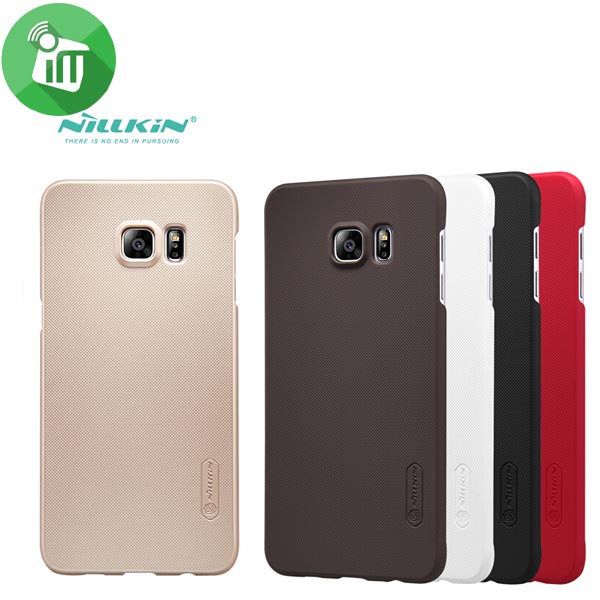
Nillkin S6 Edge Plus Super Frosted Shield Back Cover
- Compatible with : Samsung Galaxy S6 Edge Plus.
- All opening, buttons, connectors and speaker position are placed perfectly to give this case a sense of unity with phone
- The surface dust-proof, anti-fingerprint, and easy to clean.
SKU: n/a

There are no reviews yet.